
This is part 2 of my investigation into how to get views on an Android screen that a user can move by touching them and dragging them. For Moving Views in Android – Part 1, I had a couple of images positioned on the screen and got the images to move on the screen. It turns out that the views themselves were not moving, just the images within the bounds of the view. In the work that I describe here, I actually have the views moving. The key was to have a custom ViewGroup to coordinate drag and drop events for all views within the layout.
The figures below show what the app looks like in the emulator. Figure 1 shows the initial state of the app. Two images and a text view are in the upper left of the screen. The other figures show the views being dragged around the screen. Red highlighting indicates which view is moving.
Figures 1-2


Figures 3-4:


The solution feels pretty good — and it should, considering it is derived from the Android Launcher code. I had searched a long time for good touch and drag-drop examples, and never found any that were as complete as what the Android developers had done. What I like is the good object model and the clear separation of responsibilities among the classes. More on that follows in the next section.
(For more on drag-drop, see “Drag-Drop for Android GridView V4“.) 
How It Works
The Launcher is the activity that manages the workspace you see on your Android phone. Besides being able to launch apps, it allows you to change the layout of icons on the screen. You touch an icon, wait for the feedback (vibration and the change in size of the icon) that you have touched a moveable icon, and then you reposition the icon on the screen.
I made a few simplifying assumptions as I built my example activity object.
- The example app allows you to move views, but only on a single screen. The Launcher allows you to place app icons on many screens that you get to by scrolling left and right.
- The example app supports only one place where you can drop views. The Launcher supports multiple DropTargets.
- The example app allows views to be dropped anywhere, even on top of another view. The Launcher maintains a grid of icons and icons can be dropped only in the grid.
- The Launcher has animation and scaling code that is used to show a bitmap of the view being moved. The example app simply shows the bitmap.
The following classes have been adapted for my example DragView application.
DragActivity – The Launcher class was turned into my DragActivity class. It is the main activity of the app.
DragLayer – implements a custom ViewGroup, which coordinates movement of views on the screen. The Launcher DragLayer is a subclass of FrameLayout. Mine is a subclass of MyAbsoluteLayout, which is a clone of the recently deprecated AbsoluteLayout class. AbsoluteLayouts allow views to be positioned to specific absolute x and y positions.
DragController – This object is the controller that does most of the work to support dragging and dropping.
DragSource – defines where a drag operation begins.
DropTarget – defines where an object can be dropped.
DragView – This is the view that you see moving around on the screen during a drag operation. It is not the actual view you want to move, but simply a bitmap that looks like the view.
In this object model, here is how an object moves on the screen. The user touches a view on the screen. The view touched signals an event, onLongClick, to its listener, which is the DragActivity. The activity turns it over to its DragController object. The controller initiates a drag operation by first getting a bitmap copy of the view, storing it in a DragView, and displaying it on the screen. As the user moves the view, the DragLayer fields all the touch events in its onTouchEvent method. It relays those events to the DragController. It watches for the end of the touch (ACTION_UP), but in the mean time, it handles the motion events by shifting the DragView to the new touch position. When the touch finally ends, the controller checks its set of DropTargets to see which one is active and if it will accept the view being dropped there. If it does, the controller calls the onDrop method of the target. In this application, the DragLayer also implements the DropTarget interface. So the onDrop call goes to the DragLayer and it takes the view being dragged and repositions it to the drop location.
The full source code is available below. A few code sections are worth noting now.
Each view that can be moved relays its onLongClick events to the DragActivity. The connection is made in the setupViews method of DragActivity.
private void setupViews() {
...
ImageView i1 = (ImageView) findViewById (R.id.Image1);
ImageView i2 = (ImageView) findViewById (R.id.Image2);
i1.setOnLongClickListener(this);
i2.setOnLongClickListener(this);
...
}
The onLongClick handler calls on the DragController to initiate the drag sequence.
public boolean onLongClick(View v) {
    trace ("onLongClick in view: " + v);
    // Let the DragController initiate a drag-drop sequence.
    // Use the dragInfo to pass along the object being dragged.
    Object dragInfo = v;
    mDragController.startDrag (v, mDragLayer, dragInfo, DragController.DRAG_ACTION_MOVE);
    return true;
}
While the drag is happening, the DragLayer passes all touch events to its DragController. The onTouchEvent method in DragController moves the DragView and its bitmap. That creates the appearance of the view moving on the screen. The move method in DragView uses updateViewLayout, which causes the layout for the screen to be redone, using whatever new x-y positions are in effect.
void move(int touchX, int touchY) {
        // This is what was done in the Launcher code.
        WindowManager.LayoutParams lp = mLayoutParams;
        lp.x = touchX - mRegistrationX;
        lp.y = touchY - mRegistrationY;
        mWindowManager.updateViewLayout(this, lp);
}
At the end of the drag, the onDrop method of DragLayer is called. It repositions the actual view. Note that it too calls to updateViewLayout. That is what causes the DragLayer view to recalculate its layout and redraw all its views.
public void onDrop (DragSource source,
         int x, int y, int xOffset, int yOffset,
        DragView dragView, Object dragInfo)
{
    View v = (View) dragInfo;
    int w = v.getWidth ();
    int h = v.getHeight ();
    int left = x - xOffset;
    int top = y - yOffset;
    DragLayer.LayoutParams lp = new DragLayer.LayoutParams (w, h, left, top);
    this.updateViewLayout(v, lp);
}
Potential Improvements
My adaptation is not quite as clean as it should be. Roughly speaking, in MVC (model-view-controller) terms, the DragActivity is the model, the DragLayer is the view, and the DragController is the controller. It’s not clear to me that I have stayed true to MVC in this example. I think the handlers for click and long click events might be better off in the controller.
This example uses a clone of the deprecated AbsoluteLayout class. Now that I understand the Launcher code better, I see that it might be better in a real application to have the DragLayer view determine exactly where views are allowed to be dropped. That would be similar to the way it was done in the Launcher app. Its Workspace class allows drops only at empty spaces in a grid. (Note: I did something for GridViews. See “Drag-Drop for an Android GridView“.)
If you want to see an example where views are added dynamically to the DragLayer, see “Moving Views In Android – Part 3: Drop Zones“. It also shows how to give users more visual feedback as objects are being dragged around the screen.
Acknowledgements
Thanks go to the Android development team. With all the code being open source, it makes it easy for all of us to learn from their designs. A post in the Android Developers group about doing drag and drop without AbsoluteLayout pointed me in the right direction.
Source Code
The source code is available as an Eclipse project. Click here: download from Wglxy.com. Do a “clean build” in Eclipse if it reports errors immediately after importing the project.
If you find that the app does not build in Eclipse, be sure to do a clean build by using the “Clean” item on the Project menu.




 More Is Not Always Better
Cool post!
I still don’t get why you decided to used a deprecated layout. Why wouldn’t you use FrameLayout?
I would love to see part3 with rotation and resizing 🙂
Enjoy.
Why use AbsoluteLayout? It was the quickest solution I could come up with where I could verify that the view was being dropped exactly where it appeared on the screen. I already had the x-y coordinates from the touch event and that made it easy to use AbsoluteLayout.
I’m still learning so that means that this isn’t necessarily tbe ideal solution. After studying the Android Launcher code, I can see now how it’s good to let the DropTarget handle the drop and place it in the view using the LayoutParams supported by that view.
Another point is that, for the app I have been thinking about, precise placement on a graphical display seemed like the thing to do. Perhaps I could have used WindowManager.LayoutParams. That was what they used in Launcher for the DragView.
So besides your suggestions for a Part 3, I guess I should consider reworking this to get away from AbsoluteLayout.
thx, great work here…. It took me some time to understand the Launcher code but I am beginning to see the light
to get rid of the myabsolute, try to extend from CellLayout.
ps Remember to call super.onInterceptTouchEvent
In there, celllayout will store cellinfo about the current cell in the tag…
Each view in there can store extra info put too in the set/getTag() so you can retrieve info you need later
thanks a lot for your post, It’s really helpful. I’m new in Android too, and I’m trying to develop my own agenda. It can looks like google calendar, and I’ve got stuck in the “movement”. I’ll try to explain. I have my own View to customize the view of a day. There you can have events (as in google calendar). I paint those events as rectangles, with text inside. And now I can be able to change the hour of an event by touching and dragging it. But I don’t know how to get that event in a suitable “thing” to follow your post. Any idea??
I am not sure exactly what you are asking. So all I can offer right now is a way to think about the problem.
Questions I would ask myself:
My example, based on the Launcher code, uses a ViewGroup subclass named DragLayer to intercept touch events for all the child views contained within it. What does your view hierarchy look like? Which view is the container for all the event views you refer to? Have you tried adding onInterceptTouchEvent and onTouchEvent methods there? (By the way, I found another bit of doc in the Javadoc for onInterceptTouchEvent that helps me now that I’m a bit further along.)
If you already had your ViewGroup level object hooked up with those two methods, the current example would be a pretty good model for you. You could add a DragController class and have it do most of the work for tracking the movement. And you would have to take your existing event views and make sure they send click events to a handler that would initiate the drag sequence. In the example, the click is fielded by an ImageView and it calls the onLongClick handler of the DragActivity object to get that done.
You would have to do a bit more than the example on the drop side of the code. I didn’t have any special DropTargets. I would imagine in your case that you would want to give the user visual feedback as the dragged view moves over the different places where the drop will be accepted.
Hi! sorry for the late reply. That was really usefull. Now I have all my work almost done. The last thing is that I’m using a viewSwitcher, and I want to be able to drag an item from one view and drop in the following. For example, imagine an agenda. I have some task to be done one day, like “going to the dentist”, but I want to move it for the following day. As the views are “independant”, I’m using an static item to save the task I want to change, and inside onDraw method, if I come from a previous day, I draw the new task. But the problem is that I lose the movement. Any idea? Your previous one was really helpful.
Thanks in advance
Not sure what you mean by “lose the movement”. Do you mean the view moves some and then jumps back to its original position? Or what?
I mean I’m dragging something from the first view to the second one, but when I reach the second view, android doesn’t recognize that I was dragging on the first view, altough I havent release the finger to drop the object. In the first view, I do “long press” on a object and now I can move it vertically through the screen and change its position. If I move it horizontally, I want to switch the views with the viewswitcher, to have the following day on the screen but I also want to be able to have the object I was moving in order to put it in this day. When I change the view, I send to the new view the object I was moving but I guess this is wrong because although the new view can paint the object, I cant move it. I dont know if I’m explaining it a little bit better than the firs time, and so sorry, I know my english is a mess!
On another post in this blog, I responded to a question that seems like it’s related to what you want to do: drag a view from one layout to another. Read https://blahti.wordpress.com/2011/02/10/moving-views-part-3/#comment-83.
Hey,
Nice tutorial. I am doing something similar. Instead of an image view i have a custom view which i need to be able to drag. Unfortunately I’m running into a roadblock. Perhaps you can help me out.
My intention is to be able to move a view whenever i click it. I have two custom views in my activity. Both are tied up to the same onClickListener. However the click event is invoked only on one of the views.
Even when i click view2, the event targets view1 (by that i mean the View argument being sent to my onClick method is view1).
Please email me if you can help.
Before working on this example based on the Android Launcher, I had found several examples and tried a few of my own where I experienced the same thing you are saying. It turned out in all cases that the actual bounds of the view were much larger than what I thought they were. View1 overlapped View2 but I could not see it.
So I would suggest temporarily adding distinct background colors to your views and see if that shows you anything.
Dear Bill,
I ran a few tests to corroborate your findings. The view infact is drawn (by default covers the entire screen) and can be restricted by using the onMeasure method.
I had an idea – a bit complicated – but worth a shot. If we’d like to manipulate multiple views in the same screen, we must let each view act like a layer. When a touch point is received, intercept it using dispatchTouchEvent. Now our views, as you pointed out will cover a larger area than that of the canvas (which is used to draw the view. However, if we can create a “region” object that basically translates along with the canvas, we can determine the boundaries of the canvas at all times. Even when the canvas is redrawn and translates across the view, the region can accurately tell us the area occupied by the canvas on the screen
Now we simply check which view’s region contains the touch point (x,y) and work accordingly. What is your opinion on this approach?
Thanks for taking the time to reply. Appreciate it!
It does sound a bit complicated, but I don’t have all the details.
I know I feel better about the things I am working on now that I have lined myself up with the ways View work. They are intended to make it easy to connect events with event handlers without us having to do all the work to manage events and regions on our own. Unless there was some sort of performance issue associated with having a large number of views around, I would be reluctant to design something where views behaved in nonstandard way.
Hey I implemented my idea… it works. And its a lot less code too… check out my tutorial on my blog. Find the source there as well.
Dear Bill,
I liked this application. My use case is like this :
1. I have to several layouts in the screen.
2. In that i need to move the view from layout to another.
I tried with your idea. but on drop i get the exception as the given view is not child of the draglayer.
Please suggest me , how i can drap and drop the views across layouts.
thx
raj
This is interesting because I ran into the same thing when I did Part 3 of this series (see https://blahti.wordpress.com/2011/02/10/moving-views-part-3/). In that example, I added DropZones so there would be areas on the screen that would exhibit different behavior as a user dragged objects over them. Then, when trying to have the DropZones themselves be draggable, I ran into the same exception you mention.
I didn’t really come up with a solution then, but I would consider two things:
(1) move everything under one ViewGroup so all the movable views have the same parent view;
(2) arrange to change the parent view of the view being moved when that view is dropped.
I think #1 will work only if you no layouts nested within other layouts. That’s probably not the case for a lot of us.
So that leaves #2 as an option. If you try that before I do, let me know if that works.
hello sir..
ive been tryin many methods to implement drag n drop but none worked for me… your article was good…
i tried implementing your method( to be frank used ur code) to my app where in a user can dynamically add views to the layout n then reposition it..
The problem is that im being able to drag only a few pixels… if i drag it more than that it gets bak to its original position…
couldnt understand where it was going wrong…
any idea sir? thnq…
That sounds like the view enclosing the view that is being dragged is too small. How large is your DragLayer view? You might try setting the background color of the DragLayer, which is what the DragController works within. Set it to something really noticeable. If it looks much smaller than you expect and if it happens to match the boundary you reach when you drag, that would be the explanation. Then you’d have to figure out why your DragLayer size is that way.
Another possibility is that the device you are running on is not at the same API level as my example. Does my original sample code run correctly?
Im using dragLayer inside scrollview and its size is good.. tested it with background… and tried running it in both api 8 n 9 (as im working currently on 9)
Yes sir.. your original code works fine in both API’s…
Im using Eclipse helios with emulator
Found out the problem sir…
Im using draglayer nested inside a scrollview and horizontal scrollview…
When i remove them and use a plain draglayer the drag n drop is working fine..
yet to find out the reason n solution for th problem…
thnkyou
I wonder if a breakpoint in endDrag or cancelDrag would point you at a scroll-related event that is causing the drag to end early.
Thanks so much for the example! Very helpful.
Its really helpful,thanks blahti ..
I’m new to android technology.
if I want to restrict drop functionality within the circle drawn by canvas on screen,where and how should I write functionality?
Should I write it in estimateDropLocation in DragLayer.java?
I can restrict drag functionality in dragLayer of main.xml by providing android:width and height?But It will restrict to Rectangle/square and my requirement is to restrict to the circle.
Please help me to get out of this issue.
In the DropSpot class, there are three methods you should look at: onDragEnter, onDragExit, acceptDrop. In my example, the first two are used to change the background color of the view. That gives the user visual feedback that something could be dropped there. All those methods have all the coordinates you need to know where the object being dragged is located. Using those coordinates and your circle, which is somewhere within the view, all you’d have to do is come up with the code sequence that can detect that the current point is not only within the view, but within the circle too.
The same would go for the acceptDrop method. It returns true if it a drop will be accepted at the location indicated by the arguments. If the drop spot is enabled and if it is within the circle, return true.
Here are a few suggestions for finding out if a point is inside a circle: http://stackoverflow.com/questions/481144/how-do-you-test-if-a-point-is-inside-a-circle
Hope this helps.
Hi, thanks Blahti for this code. I have a question. Is possible set the XY position of a View object in the start of Activity?
Sorry my english is not good. I doing a app for put a mask over a face using recognition class of android. So I need set XY position with the coordenates returned by my method.
Please helpme!
Hi friend. Finally I did using the next code:
In OnCreate:
view = (ImageView) findViewById(R.id.imageView);
view.setOnClickListener(this);
view.setOnLongClickListener(this);
vto = view.getViewTreeObserver();
vto.addOnGlobalLayoutListener(this);
and OnGlobalLayout Listener:
@Override
public void onGlobalLayout() {
// TODO Auto-generated method stub
faceDetect(MODO_VIEW);
view.setImageBitmap(draw(MODO_VIEW));
MyAbsoluteLayout.LayoutParams lp=new MyAbsoluteLayout.LayoutParams(MyAbsoluteLayout.LayoutParams.WRAP_CONTENT,MyAbsoluteLayout.LayoutParams.WRAP_CONTENT,position.x,position.y);
view.setLayoutParams(lp);
view.getViewTreeObserver().removeGlobalOnLayoutListener(this);
}
Thank you!
Hi,
Can you highlight the part of code that actually draws red rectangles around the clicked image?
I also want in my application to somehow paint the bitmap with some color when it’s being dragged.
Thx in advance,
Milos
Take a look at the onDraw method in class DragView. A DragView is what we see moving on the screen. It’s not until the drag ends does the real view actually change its position.
Hi,
i’m trying to use these classes to implement “moving imageviews” in my project. It works, the images are moved when touched and dragged. But i cannot find the way to start the activity with the correct layout of my application. I explain better: all the imageviews are overlapped (as in your original code), i cannot put the imageviews for example on the bottom of the screen or the second at the right of the one. It seems that DragLayer doesn’t allow using margin or relative positioning on its view childs. Do you have any solution? Thanks in advance!
This example is a good introduction to drag-and-drop, but it is not the best example of using layouts. DragLayer is a subclass of MyAbsoluteLayout, which is derived from the now deprecated AbsoluteLayout class. That’s where the problem arises. I have a few suggestions for you. The first is to take a look at Part 3 of this series of notes about getting views to move. Part 3 expands on this note by fleshing out the idea of Drop Zones. If you look at its layout xml, you will see that I use a RelativeLayout within the DragLayer. That or one of the other layouts is what you’ll want to use. So you will be able to place your initial images and ones you add dynamically (also shown in Part 3) within a RelativeLayout and get the flexibility you want. Then hook up your images so they send their touch events to the DragController.
That will get the images moving, but there is a problem that needs to be solved when you end the drag. Read through the comments on Part 3 and you will see that several people have run into the problem of a View starting out inside another View inside the DragLayer. Everything is fine until you drop the view. At that point, the current code assumes that the View’s parent is the DragLayer and blows up when it tries to assign it a position there. I have not worked out a full solution, but I have made a few suggestions in those comments on several that might work. Please read those.
There’s also the approach used in the original Android Launcher code. Stop using AbsoluteLayout and put more intelligence in the code that handles the end of drop operations. If DragLayer is not an AbsoluteLayout, you’d have to place the view with updateViewLayout using a layout params of the desired type. When I get time, I hope to work through an example like that.
Thankyou so much for your reply! I’ll try to work around your suggestions waiting for part 4 of this article 😉 Cheers
When i am downloaded source code and try to import it.
It gives error of version-8 and project are not created what is the problem and what mistake i m doing.
Thanks
The Android project is compiled against Android 8. Your environment is probably set up with some other version of Android. Check the Project Properties in Eclipse to see which version you are using. My properties looks like this:
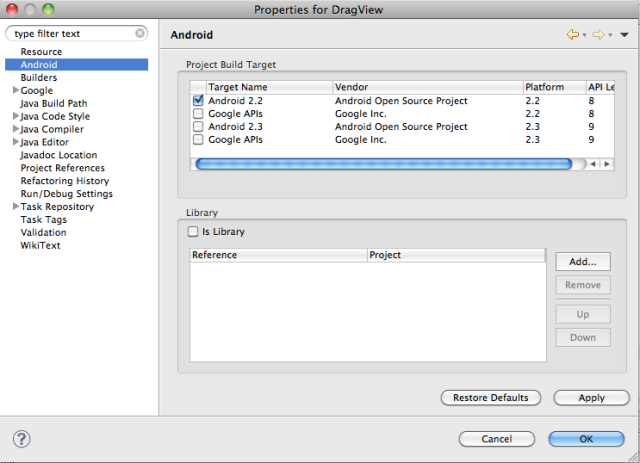 .
.
If yours is different and a version greater than 8, give it a try. Chances are good that the demo app will work. I would not, however, try with an earlier version than 8. If it does not work, you should bring up the Android SDK and AVD Manager window within Eclipse and add API level 8.
Hi Bill, This article was really helpful for me. I grabbed your source code to develop a part of an app. I would like to distribute the app, maybe with some ads or something. I want to be sure you allow this; you didn’t specify a license for your source. I will not be distributing the source, just the binary. – Marya
My intent is to help others learn about Android. Most of the source code files have this at the top:
I added that because the sources originated with the Android source code. If I understand the Apache 2.0 License correctly, you are free to do what you like with the classes you copy as long as you include that note in your source code.
Good luck with your app.
Thanks Bill! You’ve got a very helpful site! – Marya
Hi Mr.blahti,
Many thanks for your post.
I have a problem and plz help me to solve it.
About the situation:
– I have a DragLayer as a FrameLayout – which contains many sheets, named Workspace_screen – ViewGroup.
– At the time a Workspace_screen is attached to Window, I get the window token and store in a global variable.
Workspace.onAttachedToWindow() {
super.onAttachedToWindow();
computeScroll();
mDragController.setWindowToken(getWindowToken());
}
DragController.setWindowToken(IBinder token) {
mWindowToken = token;
}
– Then at the beginning of dragging action, I send this token to the DragView:
DragController.startDrag(){
…
dragView.show(mWindowToken, (int)mMotionDownX, (int)mMotionDownY);
…
}
And the problem is: while I’m dragging the view to move around the Workspace, sometimes, all the Workspace is hang up. I mean all the screen. I lost the control of screen. It can not receive any touch. But the hard key is still work, such as [Menu] key still show my customized menu but I can not touch to select any item of menu.
And this phenomenon is really rarely.
Do you have any idea about this phenomenon? Plz help me!
This sounds like it will be difficult to track down. I have had something similar happen. It seemed like debugging was not giving me any insight into the problem so what I did was add a few System.out.println statements to follow the flow through the code. Then I ran the app, switched to DDMS, and made the Logcat view as large as possible. Then I tried to make the app problem show up. In my case, I saw lots of garbage collection messages so I guessed that that was why my app become unresponsive. Then I had something I could fix. I would suggest you try something like that and see if anything in the output looks odd, particularly since you are saying that the problem does not occur all the time. You might notice a difference between running fine and being non-responsive. Hope that helps.
hi blahti,
can u tell me how to move those images in a grid structure…example: moving the coins in chessboard game or checker’s game…This tutorial helped me a lot but I would be more happy if you can help me out with this problem..Thank u
I’ve always intended to come back to this series of articles on drag-drop and do another variation based on GridView or one of the other subclasses of ViewGroup. Sorry to say that I have not done so yet. I do have a few thoughts about what I would try.
The first suggestion I have is for you to go through Part 3, the next in my series of notes about moving views and drag-drop. In that one, I added a DropSpot class, which implemented the DropTarget interface. Inside the onDrop method there are several comments about the use of AbsoluteLayout for the DropSpot class and the DragLayer class. In fact, the most interesting stuff in DropSpot are the methods that implement the DropTarget interface. So be sure to study those and understand what’s going on.
From there, the next step is to decide which subclass of ViewGroup you are going to use for the replacement for the superclass of the DragLayer class. Let’s say it was GridView. You would change DragLayer to extend GridView rather than MyAbsoluteLayout. Then I’d see what views were going to be in the GridView. Your adapter object for the GridView would be the one creating those. I have not tried this, but it might work out just right to take whatever the view is that goes in the grid and have it implement the DropTarget interface. The onEnter and onExit actions could do something similar to what DropSpot does: highlight the cell and turn off highlighting. The onAccept method would need a way to check to see if the cell is occupied already. DragLayer lets DragController do most of the work while the view is being dragged. The findDropTarget method there would have to be reworked to locate the view in the GridView that is going to accept the drop.
All in all, it’s sounding a bit difficult, and I’m not altogether sure that what I’m outlining gets you there. So that means it might be good to go back and study the Android Launcher code. It supports a grid view of some sort on the home screen, as I recall, and it had a way to detect whether a cell was open. Sorry that I can’t be more helpful in this response. It certainly feels like I need to do another installment of this series.
There is now another note about dragging and dropping. It shows how to drag objects onto a GridView. See Drag-Drop for an Android GridView.
Hi,
Its a nice tutorial. Can u tell me, When 2nd image is over the 1st image, how can we move the second image when we touch on the 1st image , on first touch it has to highlight the 1st image, on second touch it has to move the 2nd image horizontal//vertical/diagonal ? Could you please help me out with the code?
Thanks & Regards,
NSD.
It sounds like you will need to store information about which views are located at a given point. If you start with studying the DragActivity class and its setupViews method, you will see that the activity is set up as the click handler for all the views. The activity object in turn passes that to its DragController object, That object reacts to the events that happen as you drag an object around. It gets the View it thinks is moving right from the touch event. If you want to change which view moves on a touch event, you should consider adding some logic there that detects which view should move. Since the DragLayer is the ViewGroup that holds all the views, it seems like that would be a good object to ask which views are stored at a particular point.
I’d also suggest taking a look at Part 3 of this series on Moving Views and drag-drop. It has a more well-developed class, DropSpot, that implements the DropTarget interface. That will probably help you as you figure out where to add the extra information to get the behavior you want. Also, read the comment just above your question here in the list comments. I made some suggestions on how to begin thinking about using a different ViewGroup for the DragLayer.
Pingback: Drag-Drop for an Android GridView « More Is Not Always Better
Hi there, great tutorial, great stuff, its very useful.
Do you have any idea, how to implement this on custom dialogs?
I have not tried adding drag-drop to a custom dialog yet. A quick check at the documentation on Dialogs (see the “Creating a Custom Dialog” section) makes me think that it might be easy to do. A custom dialog gets its view assigned with setContentView, and that looks like it can be any layout. So it could be a layout where you have defined the outermost view to be a DragLayer.
By the way, if you have not seen my new note on drag-drop for Gridviews, check that too. It is an example that does not depend on the deprecated AbsoluteLayout class. It might be useful for you to see how it handles positioning of dragged objects in case the Dialog you are thinking about would not work too well with AbsoluteLayout.
I have question:
I wanna move the picture by just a click and then drag, so without the longclick. how can i change that becaus i get all the time an error.
Someone else has been having the same problem. I don’t have an answer, but I have made a few suggestions.
See the Oct 27 reply I made in Part 3: https://blahti.wordpress.com/2011/02/10/moving-views-part-3/
Hi blahti,
Thanks for sharing. This is really helpful tutorial for me. We have views movable in this tutorial, now can we re-size or change height/width of these views dynamically?
Regards,
Bharat
I assume you are asking how to make the view being dragged larger or smaller. In this demo, you can make the image being dragged larger by changing a line in the onDrop method of DragLayer. If you change the line that sets up the final layout params to “DragLayer.LayoutParams lp = new DragLayer.LayoutParams (2*w, 2*h, left, top);”, all images get two times larger when you drop them. Within the limitations of this demo, that illustrates how to resize. Of course, you might choose to change sizes at some other time than the start of drag. More on the limitations of this demo follow.
Please take a look at two follow-on blog articles I have done: Part 3 on Drag-Drop, Drag-Drop for GridView. The first is where I did more with DropTarget implementations. Rather than only being able to drop onto the DragLayer, it had DropSpots at various places within the DragLayer. I could imagine building an app where certain places enlarge images when dropped onto them, and others do something else to transform an image. The second one is important because I got away from depending on AbsoluteLayout, which is now deprecated. Those articles might give you some ideas on ways you could transform images (or other objects) based on where they were dropped.
One other point about “dynamic”: both of the follow-on articles illustrate how to create movable views and place them on the screen by clicking an Add button.
Can you tell me how to move from one page to other buy sliding the screen..I would be thankfull if u can help me with this..
I have not done anything yet like that, but I am interested in learning how to do it. I found this reference and been intending to study it: http://blog.stylingandroid.com/archives/537. Perhaps that will help.
There is also some code in the source code for the Android Launcher, which is where this sample originated. See http://source.android.com/source/index.html. At the time I copied source the class to look at was Workspace in package com.android.launcher2.
Hi Blahti,
One more time I am here, My question is how can we move or Drag the text ‘up’ and ‘down’ in a list view ..and that list view is connected to the database.I want you to help me with this problem by giving your valuable opinion or by sharing any sample application..
Regard
Ali
I think I have a more recent tutorial that will help you. Take a look at “Drag-Drop for a GridView“. That uses a GridView and an ImageCellAdapter (subclass of BaseAdapter). It’s not all that different from what the Android Developers website talks about in their ListView tutorial. So if you go through my article and see how it uses custom ImageView objects in the grid, I think you will be able to come up with a custom view for your list view items. The custom view will be the place where you can implement the DragSource and DropTarget interfaces to get the text in the view to change. Unlike my example, which was only concerned with display, I’m guessing that you will want to do something more than set the text in the list item. If you want something in the database to be updated that corresponds to the change on the screen, you could try to trigger it in the DropTarget methods too.
You might find you are better off breaking this task into two parts. That usually helps me think more clearly about the problem and simplifies the debugging. Part 1 could be figuring out how to drag and drop text items from one spot in the list to another. Part 2 would involve keeping the database in sync with the changes made via drag-drop.
i have tried the project.. now i have a question..can i put the small image over the other at a location and save those as a single image to sd card.
See “How To Save Jpeg Files“.
hey, i’m really new to the concept of drag and drop. I was wondering if i could drag an item say a button and drop it into a listView.
If that is not possible i would wanna add a new list at the position where i dropped the button.
I would be thank full if u can assist me with this
Dragging a button around should not be that hard. If you work through the DragSource and DropTarget interfaces and the classes that implement them, you should get a feel of the work you have to do to get a button to move. The most difficult thing in the various examples I have worked through is getting the DropTarget class to handle the view being dropped (a button, in your case). Unless all of that happens inside one DragLayer view, as described in this article, you are going to run into the problem of button view having one parent when it starts and needing to have another parent at completion of the drag. See the numerous comments and questions related to that above.
I have pointed out that this demo app suffers from using AbsoluteLayout as the parent view. That class is deprecated and you ought to look for a different way to move things around. I have looked into that a bit. See “Drag Drop for a GridView” and study that. That article is a good example of using supported view classes. You will also see that it addresses the problem of a moving a view in a situation where the parent view seems to change. There are some follow-up comments on that one that talk about how to move from the grid view to a list view, which is your concern.
Thank you for the assist.. I’m still facing problem with finding the drop position of the button. Seems like that the only constraint which is left out..
If you are asking how does the DropTarget implementing class know where to put the button, you could try something like what I did in the GridView demo. I used a custom ImageView class that knew what position it was on the grid. I arranged for my adapter object to fill in that extra information when it created the image cell view. I don’t know where you are dropping your buttons, but it seems like you could arrange for it to have whatever extra information it needs so it could complete the drop successfully.
hello,
i want to drag a circle, i draw a circle but i m not able to drag a circle on image, tell me how i drag only this circle
If you have a view that is displaying the circle, you should be able to adapt this code to your needs. Also see my newer note related to grid views. If the circle you have is within another view and there are other things drawn on the canvas, you’d have to come up with a different way to drag the circle.
Hi!
Thanks
This helped me lot !
hi,
here you are dragging and dropping image.is it possible to get copy of that image and move that copy of image.I am able to get copy of image and after dropping that copy of image i m not able move that copy of image.how to move that copy of image.
In order to move a copy of an image, you to have make sure the view holding the image has implemented the DragSource interface. All the views on the screen in this demo do that. And since you are making a copy, you need to be able to make the connection dynamically as the new object is created. This demo (part 2) did not address that, but see the two follow-up articles: Part 3: Drop Zones, Drag-Drop for a GridView. Both of them illustrate how to add objects dynamically to the screen. You will see that objects that are added implement DragSource and that the DragLayer is informed that they are on the layer.
Hi
After I drop an object to a dropSpot, how do I disable the image being dragged again ? I am trying to get a jigsaw puzzle working. Once I move one piece to destination, I don’t want that piece to be moving again.
You could remove the onClick and onLongClick handlers associated with the ImageCell. Or you could add an extra method to the DragSource interface. What occurs to me is that DropTarget has a method acceptDrag, which the drag controller calls to ask if the target is willing to accept a dragged object. On the other source side of things, DragSource does not have a corresponding method. It does not have something like “hasSomethingToDrag”. If it did, the drag controller could make that part of the protocol for a drag. At the time a drag starts, it could ask the drag source if it has something. If not, it stop the drag before it really gets started.
To anyone looking for an answer on how to start drag-drop from a single click rather than a long click see my recent post: Improved Drag-Drop for an Android GridView.
I have updated the source code for this demo (Part 2). There is a menu item that allows you to switch between long click and click for initiating a drag operation.
hi there, great article. helped me so much with a project. what i’m trying to do now and having problems is for the location of the image to be saved (sharedprefences) so it shows up the same position next time it loads.
so i tried adding the code to DragLayer – OnDropCompleted – and i get this error:
The method getSharedPreferences(String, int) is undefined for the type DragLayer
any thoughts?
getSharedPreferences works with a Context object. So you have to provide one. For a View object like DragLayer, you can use getContext (). Something like “getContext ().getSharedPreferences (…)” should work.
thank you, worked perfectly!
@XS
Can you please tell me how you did this?
Hello sir,
Thanks for a this resourceful information. Solved a major problem in my project. I need an additional assistance from your side.
Can you please tell me how to save the position of the currently positioned images so that next time the app loads the images in the same position.
How can i use savecontext and getcontext here?
For small amounts of data, I have used SharedPreferences. Then I check in onCreate to see whether I create an empty screen or restore from what is there. As for what you save, it seems like you have to save the path for each image and its location. Look in the onDrop method of DragLayer. That’s where an image is positioned on the screen. If you save that information in a data structure and then save that structure to SharedPreferences after each move, that feels like everything except for something to identify the specific image that was saved. If you are moving images that are described as resources, all you would need is the image resource id. If the images come from somewhere else, like the SD card, you’d want to save the path of the image. Check the Drag-Drop note for Part 3 too. It creates new images and positions them on the screen so they can be dragged. That might help you think about what types of information are typically needed to recreate an image view when you restore the state of your app.
@blahti
Sir, can u please provide me with little more assistance.
public void onDrop(DragSource source, int x, int y, int xOffset, int yOffset,DragView dragView, Object dragInfo)
{
View v = (View) dragInfo;
int w = v.getWidth ();
int h = v.getHeight ();
left = x – xOffset;
top = y – yOffset;
    DragLayer.LayoutParams lp = new DragLayer.LayoutParams (w, h, left, top);

    this.updateViewLayout(v, lp);
}
so do u suggest me to store Object,left and top in a data structure and access it somewhere else?
I wasn’t able to crack where this initial position of the images is stored. Please help me with this.
Yes. You will need another data structure. This demo was constructed simply to show the basics of movement. In an application, there is going to be a real reason for moving things around on the screen. If your app moves images, you’d want to save something that identifies the image, its size, and location. By the way, to convince yourself that you have found the right location values, temporarily substitute something for left in “new DragLayer.LayoutParams”. Put in some fixed value or even “left * 2”. When you release a dragged object, it will jump to that final location. Some of the later demo apps on this blog might be useful to look at too, if you should find that you do not like working with absolute x and y coordinates.
Good Afternoon,
When the imgeview set the values with imgeview,setX(100) and imageview.setY(100). The program does not work correctly.
Take a look at Part 3. There are examples there of dynamically adding views to the screen. See method onOptionsItemSelected in DragActivityV2. Also Drag-Drop for a GridView is worth looking at. It shows placing views on a screen — and it does not use the obsolete AbsoluteLayout.
Suppose i store the values and the position in shared preferences, Where should i use sharedpreferences again to load them back? In MyAbsoluteLayout?
Consider doing that in onCreate or onResume of your activity. If you are not yet familiar with the activity lifecycle, you should take a look at the Android developer website information on that, or start with my introduction to activities.
I’m trying to set the layout parameters for my DragLayer in code. I keep getting a ClassCastException with that. How do I do that? Here’s my layout params.
// Make sure it’s filling parent
DragLayer.LayoutParams params = new DragLayer.LayoutParams(DragLayer.LayoutParams.MATCH_PARENT, DragLayer.LayoutParams.MATCH_PARENT, 0, 0);
this.mSelectionDragLayer.setLayoutParams(params);
Something like this: java.lang.ClassCastException: com.blahti.example.drag2.MyAbsoluteLayout$LayoutParams.
Right?
You cannot use AbsoluteLayout.LayoutParams in something that is not an AbsoluteLayout. Look at the layout in which your DragLayer is embedded and use LayoutParams appropriate for that kind of layout. The parent view’s layout is what matters.
I’m adding it as a child to a WebView. AbsoluteLayout is the only one that doesn’t crash it. What can I use other than that? I have another view added as a child for a loading screen and ViewGroup.LayoutParams works for that, but not this.
Also, thank you so much for posting this. This very well may save my life on this project.
It is probably a consequence of DragLayer being an AbsoluteLayout subclass. Find something you can add to the WebView dyanmically, like a FrameLayout or a LinearLayout. Then arrange for the DragLayer to be nested inside of it. You might have to use an inflater to create the view from xml.
Nevermind. I’m an idiot. This worked.
// Update Layout Params
ViewGroup.LayoutParams layerParams = this.mSelectionDragLayer.getLayoutParams();
layerParams.height = contentHeight;
layerParams.width = ViewGroup.LayoutParams.MATCH_PARENT;
this.mSelectionDragLayer.setLayoutParams(layerParams);
Glad it worked.
Hello
I have just completed a simple piece-dragging mechanism to use in a simple Android word puzzle game, in which the user has to move letter pieces around the screen to spell a word that matches a given displayed picture (such as C A T).
The code required to allow the user to drag – using finger touch – the pieces (each a TextView containing a single character) around the play area (the parent RelativeView) is quite simple and brief
public void movePieceTo (TextView txv, int x, int y) { // 120525
Log.v(LOGTAG,”movePieceTo: ” + txv.getTag() + “: x=” + x + ” y=” + y);
RelativeLayout.LayoutParams params = new RelativeLayout.LayoutParams(txv.getLayoutParams());
params.setMargins(x, y, 0, 0);
txv.setLayoutParams(params);
}
public class PieceTouchListener implements OnTouchListener { // 120525
public TextView txvDrag=null;
public float xBgn, yBgn;
public boolean onTouch(View v, MotionEvent evt) {
int act = evt.getAction();
float x = evt.getX(), y = evt.getY();
TextView txv = (TextView)v;
String txvDragTag = “”;
if (txvDrag != null) txvDragTag=(String)txvDrag.getTag();
String strMsg = “txv touched: ” + v.getTag() + ” Event: act=” + act + ” x=” + x + ” y=” + y + ” txvDrag:” + txvDragTag;
Log.v(LOGTAG, strMsg);
switch (act) {
case MotionEvent.ACTION_DOWN:
txvDrag = txv;
txvDrag.bringToFront();
xBgn = x; yBgn = y;
break;
case MotionEvent.ACTION_MOVE:
if (txvDrag == null) break;
if (txvDrag != txv) break;
int xNew = (int)(txv.getLeft() + (x – xBgn));
int yNew = (int)(txv.getTop() + (y – yBgn));
movePieceTo(txv, xNew, yNew);
break;
case MotionEvent.ACTION_UP:
txvDrag = null;
}
return true; // To allow MOVE and UP events to register here, not just DOWN events.
}
}
In the loop in which the pieces (TextView objects) are created, in a method not shown here, each piece is assigned the above touch listener:
txv.setOnTouchListener( new PieceTouchListener());
All the code shown above is within the MainActivity class module. But much of it could be encapsulated into other, external classes to allow it to apply more generally.
I have also implemented this using an AbsoluteLayout parent (modifying the movePieceTo function to suit), and it works just as well.
Cheers!
Thanks for sharing your example. I will give it a try.
Hi Bill, I am trying to drag and drop a view in android 2.1 and above with onTouchListener. Well i am able to touch and drag and drop a view, but its not a as smooth transition as i want it. Can i have guidance over here.
I have pasted my code over here. I have a single image inside linear layout.
package com.ameyworld.demodragproject;
import android.app.Activity;
import android.os.Bundle;
import android.util.DisplayMetrics;
import android.util.Log;
import android.view.MotionEvent;
import android.view.View;
import android.view.View.OnTouchListener;
import android.widget.ImageView;
import android.widget.LinearLayout.LayoutParams;
public class DemoDragProjectActivity extends Activity implements OnTouchListener
{
int windowwidth;
int windowheight;
private LayoutParams layoutParams;
private ImageView ball;
private int buttonPosition;
private DisplayMetrics metrics;
@Override
public void onCreate( Bundle savedInstanceState )
{
super.onCreate( savedInstanceState );
setContentView( R.layout.main );
metrics = getApplicationContext().getResources().getDisplayMetrics();
windowwidth = getWindowManager().getDefaultDisplay().getWidth();
Log.d( “DemoDragProjectActivity-onCreate”, “WindowWidth::” + windowwidth );
windowheight = getWindowManager().getDefaultDisplay().getHeight();
Log.d( “DemoDragProjectActivity-onCreate”, “WindowHeight::” + windowheight );
ball = (ImageView) findViewById( R.id.ball );
Log.d( “DemoDragProjectActivity-onCreate”, “Height ::” + buttonPosition );
ball.setOnTouchListener( this );
}
public boolean onTouch( View v, MotionEvent event )
{
switch( v.getId() )
{
case R.id.ball:
layoutParams = (LayoutParams) ball.getLayoutParams();
switch( event.getAction() )
{
case MotionEvent.ACTION_DOWN:
break;
case MotionEvent.ACTION_MOVE:
int y_cord = (int) event.getRawY();
Log.d( “DemoDragProjectActivity-onTouch”, “YCord::” + y_cord );
if( y_cord > ( windowheight – ( metrics.density * 200 ) ) )
{
y_cord = (int) ( windowheight – ( metrics.density * 200 ) );
layoutParams.topMargin = (int) event.getRawY() – ( y_cord );
}
else
{
layoutParams.topMargin = y_cord – 350;
}
ball.setLayoutParams( layoutParams );
break;
default:
break;
}
return true;
}
return true;
}
}
Hi, May i know how to change the position of the the image e.g. to x=50,y=100
In code, you can do something like this:
DragLayer.LayoutParams lp = new DragLayer.LayoutParams (w, h, left, top);this.updateViewLayout(v, lp);
If you want to do this in a layout xml file, use the deprecated AbsoluteLayout object and set x and y using xml attributes.
By the way, you might want to look at Drag-Drop for an Android GridView. It is an example of doing drag-drop that does not rely on the obsolete AbsoluteLayout class.
Thanks. May i know how to allow 1 image inside 1 drop_spot only. E.g: If the drop_spot is already filled with one image, then it will not accept any other images.
You have to put a little bit more into your drop spot so it knows it is full. Then when the DragController calls its acceptDrop method, it needs to return false to indicate that it is full. An example of this is in the GridView example I mentioned earlier.
Hi, can you tell me what exactly i need to add to the drop spot as i not really know what to add and where to add the code in this example.
Sorry that I cannot help more. Please study the examples already on this blog.
Hi, how do i know which image is being drag and drop to which spot?
In this particular demo, I did not do anything to identify the image. You could store something in the image view’s tag (see setTag method), or you could build a custom ImageView where you could store information. That’s what I did in Drag-Drop for GridView. Take a look at that note.
I still not understand, can you please provide some sample code for me.Thanks.
Sorry that I cannot help more. With the three different sample apps, you should have sufficient information to solve the particular problem you are facing in your app.
Thanksssssssssss Friend. Awesome demo.
Really good example of drag and drop object. Can you please help the sort out the reverse scenario where user can drag from grid view and drop on single image ? [ source and target are interchanged.] Thanks
Check my later demo app related to GridViews: Drag-Drop for a GridView. That example has an area that looks like a trash icon. You can drag objects to it from the grid.
Hi Mr.Blahti,
Many thanks for your post.
I have putted draglayer inside horizontalScrollview .
The code works fine, it doesnt give any exception but it not able to drag the child imageview.
Please help.
Thanks in advance.
Inside a ScrollView there could be problems. Where are the touch events going? If you stick with long-press (long-click) to start a drag-drop operation, you probably will not get in the way of a normal touch that starts the scrolling. If it is not working, I would suspect that the ScrollView is getting all the touch events and handling them. You have to arrange for the long-press event to get to the DragLayer and DragController.
Hmmm … I too am having no success with using ScrollView or HorizontalScrollView. My goal is to have a ‘canvas’ that is twice or three times as wide/tall as the device screen. A user could then scroll this canvas and then reposition the views by touching/dragging. Any ideas? Thanks in advance for any assistance.
I started with the Android Launcher code when I did this work. It does both dragging and scrolling, which is what we experience on our Android devices when we move application icons around. To simplify things, I left out scrolling so I could concentrate on the essential elements of drag and drop. I don’t have any code to offer. I suggest getting a copy of the drag-and-drop code in the Launcher and studying that to see how they scroll the background while maintaining the drag image. You’d want the Launcher code from Android 2.2 or 2.3.3 to match this example. Though, studying the newest code would be instructive also. See Android Source code.
Another thought on this: figure out how ScrollView works, in the sense of what methods get called to show information scrolling in response to touching the screen. Then call those same methods in DragController when it detects that it is near the bounds of what fits on the screen.
Can i rotate and Zoom that image in DragView examples
Yes. Look inside the DragView class. There are variables DRAG_SCALE and mAnimationScale. And you can add others effects as you draw the view in onDraw.
how can i aliign those images which is placed inside the drag layers. i cannot use margin options instead padding is available but its not convienient.
This demo app is based on the Android Launcher code from version 2.2. When I converted it, I used AbsoluteLayout (now obsolete) as the layout for the drag layer. Since then, I have done a few more demo apps, one of which uses supported layouts. See “Drag-Drop for an Android GridView“. Study it and see how it uses a GridView. That kind of layout gives you much more control over placement of images. Once you understand that one, I think you can adapt the code to whatever layout you’d like to you. It seems that you should start with a test activity where you perfect the layout and alignments you intend to use. Then add drag-drop there.
Hi blahti,
The drag and drop series are fantastic. It really helps with my project. But now I want to use onDropCompleted() in an activity object as a callback function for different draggable UI object that I declared in the xml or added within an activity object. Because in my case, I want the drop event triggers different actions based on the UI object or the drop target object. Is it possible with a little changes to the framework you created?
Thank you very much.
I don’t know the specifics of your case, but it should be possible to connect the two.
If you wanted the other object to be draggable using the code of this framework, have it implement the DragSource interface and arrange for it to be part of the DragLayer. (By the way, a cleaner example of dragging and dropping is in a later post: Drag-Drop for a GridView.)
If you want onDropCompleted to callback into your other code, I don’t see why that would be a problem. The good thing is that by the time onDropCompleted runs, all the tricky stuff with handling touch events is over.
Also, check the new drag-drop framework for Android. The code I have shared is based on the old Android 2.2 Launcher code.
Hi, really lots of thanks for this example, but there is problem that i want keep my images 3*3 fashion at the begining and then i want to drag and drop on the image. I am not able to set my images in 3*3 fashion. please help me out in this problem.
If you want a grid of images, take a look a “Drag-Drop for an Android GridView“.
Wow, so complicated to move an image or text, amazing. Thanks for all that help I am going to need it.
Wow, once again it’s incredibly complicated to do such a small thing. It feels like you have to build the space shuttle to go to the corner store to buy some milk. I am a beginning android/java programmer, what steps would you recommend to try and understand all of this?
I too was amazed when I first started. I had hoped that drag-drop would be easier. Parts 1, 2, and 3 of my series on Moving Views shows the stages I went through in understanding some of the basic things about it. Since the time of this writing, Android has introduced new support for drag-drop. You should take a look at that too. See Drag-Drop.
I have not used it yet in any of my apps, but it does seem like a good framework. There are parts of the old Launcher framework (what my work is based on) that I really like. One day I hope to adapt it to the new Android framework.
Thanks again. I will study the new Drag & Drop in the hope that things may be a little simpler.
Pingback: How do I resize Layout/View size manually or dynamically : Android Community - For Application Development
Pingback: Creating a view for highlight or select a particular part of image? video
Pingback: Creating a view for highlighting or selecting a particular part of image? : Android Community - For Application Development
Pingback: Multitouch Panning and Zooming Examples for Android « More Is Not Always Better
hi sir ,
i have a moving object
basically a ball moving up and down now
i want to drag and drop this moving object on touch event and as soon as i release the mouse the ball starts moving again ie default up and down motion please help .
asym
It sounds like the drag-drop operation did not end properly. If you are still working with the code in the demo app, you might check the original code and find the places that set the variable mDragging in DragController. You might have removed one of those or you might not be calling endDrag any more, which is one of the places mDragging is set to false.
Pingback: How to Longtouch to drag text on bitmap moves to up, down like InstaWeather did (Android) : Android Community - For Application Development
Pingback: Drag-Drop for Android GridView (V4) | More Is Not Always Better
Pingback: Drag-Drop for an Android GridView | More Is Not Always Better
Post the code for Drag and drop items from one gridview to another gridview for 2.2 api
Is this what you are looking for? Drag-drop for a GridView.
I built that with Android 2.3.3, but I think it will compile and run with Android 2.2. Just change set android:minSdkVersion=”8″ in AndroidManifest.xml.
good tutorial. thanks for post.
I want to zoom in, zoom out in this demo “Moving Views In Android – Part 2, Drag and Drop “. let me know about this problem?
thanks again!
I need drag and drop gridview item from one gridview to another gridview for api 8. Develop for this please and post the ocde
The current version compiles with Android 2.3.3, but I think it will compile and run with Android 2.2. Just change set android:minSdkVersion=”8″ in AndroidManifest.xml.
If you want to have more than one GridView active in the app, all you have to do is use the code in my GridView example. In onDragStart of DragLayer, find the code that goes through the GridView children and adds them as DropTargets. With a second GridView, you could do the same.
Hello blahti,
this work is just great! I´m actually trying to have some achievements using drag and drop but I can´t find the clue. I found your job some hours ago and I started to play with it, actually what I would like to achieve in is using drag and drop with and overlay button (always on top of any app ) added through WindowsManager, I thought you might have some ideas about how I should approach this issue.
Thanks a lot.
I’m not sure I have any suggestions. I have not done anything with WindowsManager. Most of what I have done relies on there being a ViewGroup in which all the events can be handled. I do not know how WindowManager fits in with that. However, the newer drag-drop framework introduced in API 11 might be able to do it. I have one example that is built with that: Drag-Drop for a GridView (V4).
Hi blahti,
Please guide for me, how i can rotation item in this view, i use 2 button, rotation left, and right. thanks
I have not done anything with view rotation before. I have done some work with animation of other properties of objects. I would guess that you can start an animation when the drop operation completes. For what I have done, I have usually attached a new view in which the animation is done via the view’s onDraw method. Is that what you have in mind? Are you trying to have an animation start at completion of the drag-drop operation or during it?
Hi all =)
Your tutorial is very nice !!!
But I need to save the image dropped, how to do it???
I’m tryng to save the adapter but more object (Context/ViewGroup etc..) cant’ saved on file because are Visual…
Can you help me ?
In another project I wanted to be able to save and view images. I found the following reference extremely useful: http://developer.android.com/training/displaying-bitmaps/index.html .
when I use setRotation method of a button in drag layer, when I drop it somewhere, sometimes it goes to wrong spot. Why can it be
I have not used setRotation before, but I do note that the documentation for View includes methods like setRotationX, setRotationY. Perhaps those values are linked to original position of the view. If the view x-y changes, I would have assumed that those would change too, but maybe not. Are you calling setRotation during the drag-drop? If during, I could imagine that messing things up. So, no definite answer, just a few things to investigate.
Hey Bill I really liked the tutorial and it works great when I run it!
I have been trying to take it apart and seeing what makes it tick and I can not find where the default positions of the photos are put. I tired playing around for hours and still couldn’t get those buggers to move to a new initial position.
If you can help me out that would be great!
-Bill A
The images are defined as ImageView objects in res/layout/main.xml. I do not think there’s anywhere that repositions them. As the article says, this demo used the now obsolete AbsoluteLayout.
More dynamic treatment of images can be seen in a few of the other posts on the subject. See Drag-Drop for a GridView and the articles it references.
Really nice explanation, also could you help me in transformation and rotatation each view on multi touch gestures?
I have done a little work on transformation and rotation. See Rotate and Scale Bitmap Example
cool post… thank you… its very helpful
Hi,Thanks for such a great post,I am trying to implement similar,Actually instead of absolute layout i want listview.Listview’s eah row is ofdifferent layouts,one row contaiing viewpager and other two containing other layout.i want to do drag and drop on these listview items.can you please please help me with this??? i am stuck here like anything…
Thanks in advance
In the “Part 2” article, I used AbsoluteLayout, even though it was deprecated. Check some of the newer articles, which use a grid view. Grids are close enough to list views that I think it will help. The newer articles rely on being able to find all the drop targets on the screen. That’s code you write and put in the place where the drag starts. See method onDragStart in DragLayer of the newer articles: Drag-drop for a GridView or Drag-drop (v4).
Hi, Thanks , I read your posts. I was looking for something similar. But i am little confused. I wish to know how to achieve tile switching. e.g As your post shows, we can drag and drop a tile. But i want one step further. If we drag and image in tile 1 to tile 2, the images in both the tiles should move respectively to the tiles. i.e drag image 1 in Tile 1 to Tile 2. Drop in Tile 2, should move image 2 in Tile 2 to Tile 1. like tile switching (image switching).
You might want to check my GridView drag-drop article. It moves something from one cell to another. At the time of drop, the code knows both the starting cell and the ending cell. That example just does the move one-way, but given that the information is available, it would be easy to update cell 1 and cell 2.
Hi Bill, Thanks for your explanation. I tried to download your code, but i cannot access it. The link is not working.
From your blog , i see that there are lot of classes used. My entire code is inside just 1 mainactivity and i use grid view and adapter inside the same activity class. I am confused about your code as it has lot of classes. Please tell me what are the main class and methods to concentrate to achieve drag and drop (swapping) . Please help me to achieve it by adding them inside my main activity
Sorry,something is wrong with a Google doc viewer. Use the download icon on the wglxy.com page for the demo app. The download icon is to the right of the date and the version number. That one works fine. When you click on the the zip file link, it goes to a Google Docs/Drive viewer for zip files. That one reports a 415 error.
There are quite a few classes. Some are just interface classes. The classes divide up the responsibilities needed for drag-and-drop in a way that should make it more modular and reusable.
The newer drag-drop interface might be more to your liking. I have done one demo app for that. See Drag-Drop for GridView (v4).
Hi Bill,
Can you tell me how to swap the images inside the cell. That part is not there in your demo app. Please let me know how to swap the images between the two grid
Please check the comments in the article for drag-drop in a GridView. Several people have suggested ways to handle image swapping.
Can you tell Me how to get zoom/drag/rotate for multiple image views in a single layout,
it’s challenging work for me to provide zoom to imageview when two or more imageview in a single layout ,
and also it’s have to maintain z-order too like one imageview have to bottom of all views and another is top of
that imageview.
i have goggled for every possible view or custom view but still i did’t get zoom/drag and rotate for every view .
i have achieved only one thing that is drag using custom imageview .
I have not done the combination that you ask about. I have done separate elements though. Have a look at some of these articles: (1) scaling and rotating bitmaps; (2) panning and zooming around a fixed point. The second reference was my initial work in preparation for work on a space war game. In that I found it easier to write a custom view, rather than support a layout of image views. The view writes bitmaps directly onto a Canvas. That made it easier to support zooming and rotating some of the images. Z-order worked out too because I could write the bitmaps onto the canvas in the order that fits the app.
My requirement is drag/zoom/rotate multiple images dynamically.I found very useful tutorial on this http://www.codeproject.com/Articles/319401/Simple-Gestures-on-Android
But right now it doesn’t support multiple images with drag/zoom/rotate dynamically. i know to steps how to achieve it:
To do that you need to apply the rotation logic here to a “selected” image out of a collection of images (Bitmaps) owned by the View.
Roughly, that means that would would have to:
1. Change SandboxView to hold a collection of Bitmaps by replacing
private final Bitmap bitmap;
with
private final List bitmaps;
. 2. Add methods on the SandboxView to populate the collection mentioned in step 1. 3. Detect which Bitmap is the “selected” one on a touch event. 4. Apply the transform calculations in this article to the “selected” Bitmap only.
Step 1, 2 and 4 are simple enough to implement but step 3 is actually a bit tricky if you go down the path of using this approach where a View owns the images that can be manipulated. The reason for this is that you need to manually track things like Z-order[^] yourself, and also figure out what to do in a multi-touch gesture where each finger “touches” a different image.
This article is mainly about showing and explaining the maths required to do this, it’s not really a good example of a reusable component. I think you might be better off looking for a control that allows you to have multiple images (Bitmaps) visible whilst also allows you to customize the layout.
But how to implement it. If anyone has idea about it then please help me.. any help will be appreciated.
very very very amaaaazing work.. thank you 🙂
Hello, Sir. I have used this method and a problem occured with me. The image view can be dragged outside the bound of the layout. How can I solve this problem? I have implemented a differnet codes and none of them works
The original demo app allowed the images to move within the DragLayer view. So it really depends on how you set up your DragLayer and your DragController. Also note that this demo app is several years old and made use of a deprecated class for AbsoluteLayout.
You should also take a look at the newer demo apps. See https://blahti.wordpress.com/2011/10/03/drag-drop-for-android-gridview/ for an app that uses a DragController that allows dragging to any of the views within a larger view.
Hello bill, Thanks for posting about drag and drop. I had one problem i took textview instead of imageview after dragging the textview to somewhere on the screen i tried to increase the size of that textview but it is not increasing before dragging its increasing after dragging i’s not. Please help on this issue.
I have done several tutorials related to drag and drop. (Be sure to see the one for images in a GridView.) In all of them, I do not actually move an ImageView or TextView around the screen. What actually goes on is that an image moves around on the screen that appears to be the image in question. When the user drops that on a target location on the screen, information about what is being dragged is transferred from the the source view to a target view. I found that easier to do than actually moving a view from one spot in my screen layout to another.
So, in your situation, you might try something similar. Keep track of the text from the first view using the classes of the drag-drop framework. When the information is dropped onto a second text view, set the text of the second view. Then go back to the original text view and set its visibility so it is hidden (“setVisibility (View.Gone)”). The advantage of doing it this way is that you get to see the second text view inside the final layout and you know it’s the right size. By the way, if the second view is initially hidden when the drag starts, you’d also sets its visibility (“setVisibility (View.VISIBLE)”)
Hi this works find but i am having one problem in this when suppose i have set image view like
i1.setX(125); i1.setY(125); i2.setX(155); i1.setY(155); then when i try to drag then its not draaging eject postion where ever i set my finger touch its move 125 ,125 x,y from finger touch can you please tell me how to fix this thxn
This post was done very early on in my understanding of Android drag-drop. It uses a deprecated (discontinued) AbsoluteLayout class. I would suggest studying the later articles I have written about drag-drop. They show ways to do drag-drop with newer Android classes.
The other articles can be found here: https://blahti.wordpress.com/2012/03/26/my-android-tutorials-by-topic/#dd
I posted my code my expected output is suppose any view i kept it on (x,y)(200 ,200) then when i dragged from one position to another position it should drag desire touch position actually i have one list view when i dragged one view to drag layer it always set on zero zero so what i did for that i set view view.setX(event.getX) and viewsetY(event.getY) after that i am calling DrageController class method start drag then it not working dragging for that i i have apply one condition when first dragged completed then i setViewX(0) and setViewY(0) after that dragging is working properly so i need only when any view which is x,y position drag layer then it should drag from one position to another position proper way . thanx for your last reply .
Thanx its done it was nice post really after long try play with given i have achieve this thanx .
Hello bill your post is awesome i just want to know can we achieve this suppose 3 view overlap touch to each other (bottom ,middle,top) what i want when i touch on bottom then view should bottom position comes on top and top position should come in middle and middle position should go bottom please suggest me if we can do this using given code.
hii im new android and i want to save the changed position of button or image view …. after the drag and drop i clicked a button and that button save the position pls any buddy help me
When you have only have a small amount of data to save, you can often get by with using shared preferences files. See https://developer.android.com/training/data-storage/shared-preferences.html. If you have a fairly complex object or set of objects to save, consider converting them to a Json string and then saving that string in shared preferences data. See https://developer.android.com/reference/android/util/JsonWriter.html.
In terms of saving things that you have dragged and dropped, you should work on your views and code so that they can get started with different starting positions, rather than the initial positions defined in your layout files. Once you have that working, you can figure out the save and restore method you would like to use.
Pingback: Android drop imageview over other imageview which is same in size [closed] - Tutorial Guruji